
Prompt-Driven Development
PDD turns natural language (The Last Programming Language™) into running software.
PDD is a way to build software with your coding agent. Your agent writes the spec in natural language: the prompts and the user stories. You run it and try it, and then the code comes.
A session with your agent
Ask for what you want, as usual. Your agent uses the PDD skills. You do not have to learn them: you only review the user stories, try the app and approve.
Build a phone app for my coding agents: see what needs me, answer their questions, and manage my machines.
Used the pdd-feature skill
Wrote 5 prompts, a user story with its tests, and 2 screen drawings
Please review the user story. Is it what you want?
Why PDD
Agents build first.
You find the problems later.
AI made coding fast, but you still learn if it is right only after the code. PDD lets you learn it first, in a spec that runs.
You start one task at 9:00. The same task, with the same five mistakes in the prompt.
The whole day
4 h 22 of your day back with PDD. The same task, the same five mistakes.
How PDD works
Two stages:
prompt space, then code space.
These are our names for the two stages of a PDD project. You decide in prompt space. The code follows in code space.
Stage 1
Prompt space
There is no code yet. Your program exists as prompts and user stories, and you can run it.
- ChangeEasy and quick. Your agent edits a prompt, not many files.
- RunYour user stories run on the PDD runtime, with their test vectors. No code needed.
- YouRead the user stories, try the program and approve the prompts.
Stage 2
Code space
Your agent writes the code from the approved prompts. The code must match the spec.
- ChangeChange the prompt, then make the code again.
- RunEquivalence checks: the same test vectors, plus formal verification, run on the real code.
- YouReview the pull request and merge it.
Prompt
The source of one part of your program, in natural language. The code is made from it.
User story
A user story says, in natural language, what a person can do with your program, with numbered acceptance criteria and real values.
As a developer away from my desk, I can answer my agent’s question from my phone.
Test vectors
The tests of a user story: exact inputs and expected results for each criterion. They are made in prompt space, and the code must pass them too.
Prompt space
Run your spec.
Before any code exists.
Check runs all your user stories on the PDD runtime, like a test suite, and gives you a report. Try is the hands-on one: you use the app yourself. You can do them in either order.
Answer from the phone
What should happen
When an agent asks a question, Now shows it under “Needs you” with an Answer button.
AC1 · 3 checksI tap Answer, pick “Keep the existing behavior” and tap Send. The agent gets my answer, and the card moves to “Working now”.
AC2 · 4 checksWhen the agent’s machine is offline, Send is off and the sheet says “Alex’s Mac is offline.”
AC3 · 2 checksTry it yourself
Your agent starts a Try and gives you the link. The Try runs your prompts as the program. You use it the way a user will, and you find problems before any code exists.
Click and tap through a screen that the AI draws.
Run your command in your own terminal.
Send requests with curl to 127.0.0.1.
A chat on the Try page. Your own agent explains the program and fills the fields from your request.
Let me try it on my phone.
Started a Try for “Answer from the phone”: https://…/s/…
Open the link on your phone. Tap Answer on the “Checkout tests” card, pick “Keep the existing behavior” and tap Send. The card should move to “Working now”.
Try “Answer from the phone”
▸ What should happen (3 acceptance criteria)
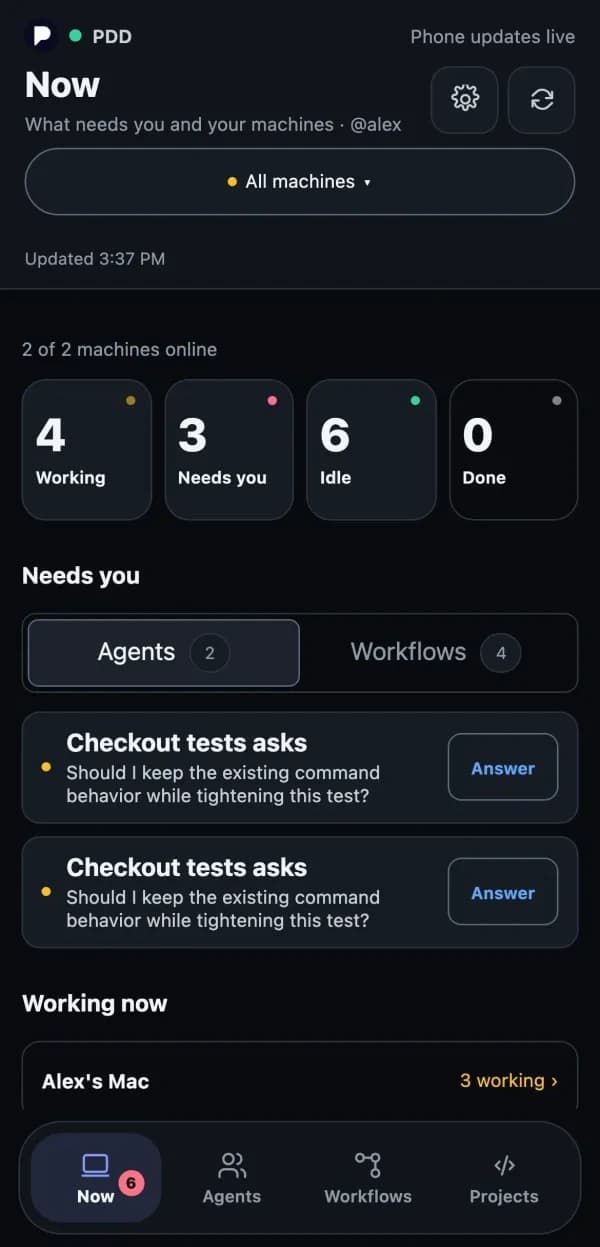
The AI draws the screen from the prompts. Every button works.
What happened
1 AI call
Next: tap Answer on the “Checkout tests” card.
Built with PDD.
Our phone app for coding agents
See what your agents need, answer their questions, and manage your machines, from your phone.
Prompt Driven Studio
Speak a 3D scene into your room, plan the camera, and render photorealistic video, for XR devices.
An AI simulator
An AI simulator for industry scenarios.
Get started
Install PDD
in your repo.
PDD is made for coding agents: Codex, Claude Code and other agents that use skills.
- Node.js 22.20 or newer, Git, and the GitHub CLI, signed in.
- A coding agent that uses skills, signed in.
- Access to the PDD runtime, for checks and Tries. The README tells you how.
- Tested on macOS and Linux.
$ npm install -g github:promptdriven/pdd
$ npx skills add promptdriven/pdd#alpha -g
$ cd your-repo
$ pdd setup
Then ask your agent for a feature. It uses the PDD skills.
pdd setup adds PDD to this repo’s AGENTS.md (or CLAUDE.md). The skills work in all your projects.